



OnRepOnRep
GeneralRunningHYROX
Sessions
GeneralRunningHYROX
FeaturesPricingLearn exerciseFAQLoginStart Free
Actual app screens

Not another logbook. An app that shows why you improved.

Actual OnRep onboarding app screen.Actual app capture
Actual OnRep HYROX specialized session app screen.iOS and Android
Actual OnRep running ghost pace app screen.Actual app capture

OnRep gives strength, running, HYROX, and watch workflows their own recording structure. These are real app captures used for store screenshots.

Install OnRepSee specialized sessions
App StoreGoogle Play

16-segment growth analysis

GPS and watch status

Exercise-specific metrics

Actual OnRep onboarding app screen.Actual app capture
Actual OnRep HYROX specialized session app screen.iOS and Android
Actual OnRep running ghost pace app screen.Actual app capture
App Store product proof

Specialized sessions feel different the moment you open them.

When training spans strength, running, and HYROX, context gets scattered fast. OnRep separates the numbers and next actions each session actually needs.

Actual OnRep HYROX specialized session app screen.

HYROX

Eight runs and eight stations without losing the flow.

Typical appsA generic workout log hides runs, stations, transitions, scaled loads, and team splits in one flat entry.
OnRepOnRep keeps the next segment, undo, target time, elapsed time, and bottlenecks inside the race flow.

Singles, Doubles, Relay, Open, Pro, scaled setups, segment timeline, heart-rate response, and station review.

16 segmentsNext / UndoScaled setupTeam flow
Actual OnRep running ghost pace app screen.

Running

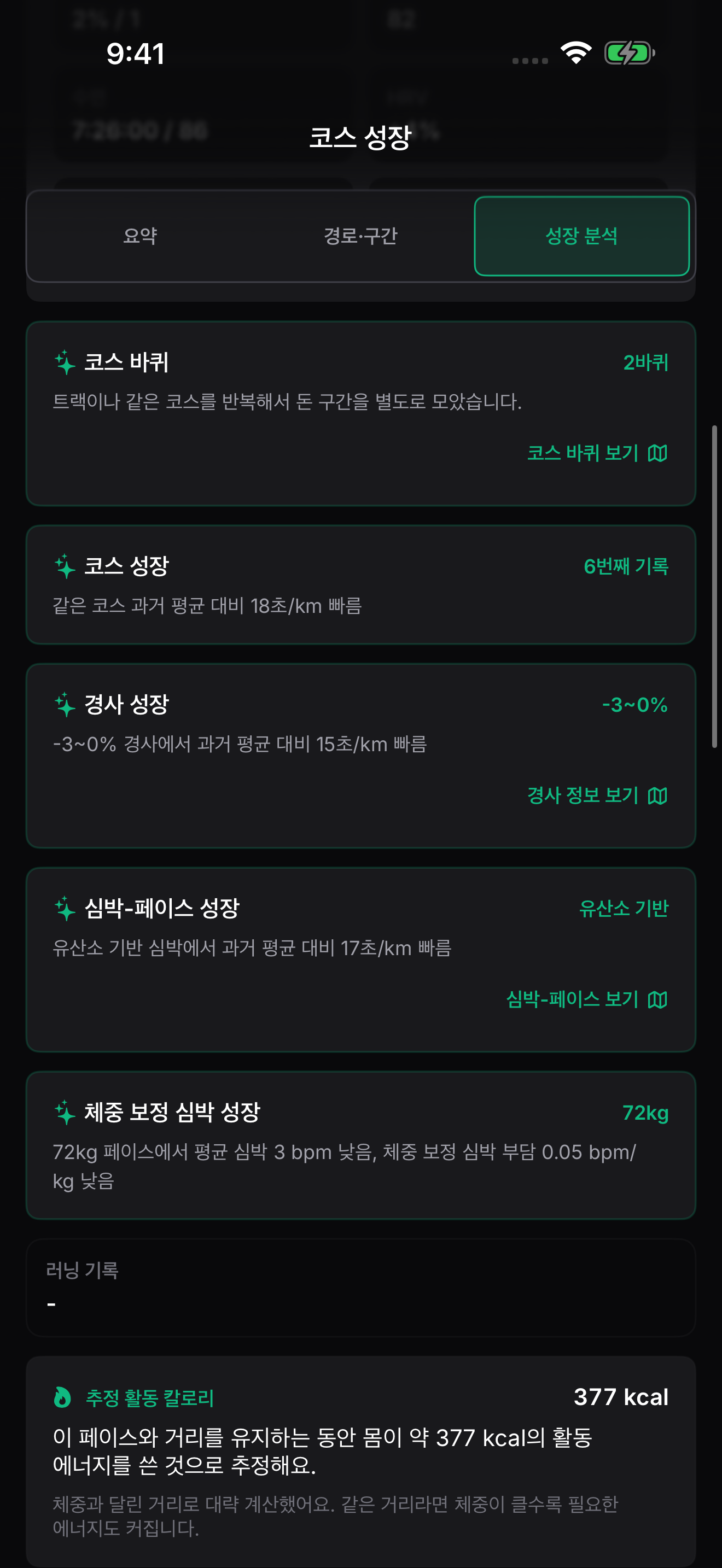
See why the run was faster.

Typical appsPace and a map do not tell you whether the route matched, the climb improved, or the same heart effort got faster.
OnRepOnRep separates ghost route, same course, laps, grade, and heart-rate zones so the improvement is easier to read.

Ghost pace, same-course detection, lap splits, grade bands, same-HR pace, sensor confidence, and PR character.

Ghost routeSame courseGrade paceSame-HR pace
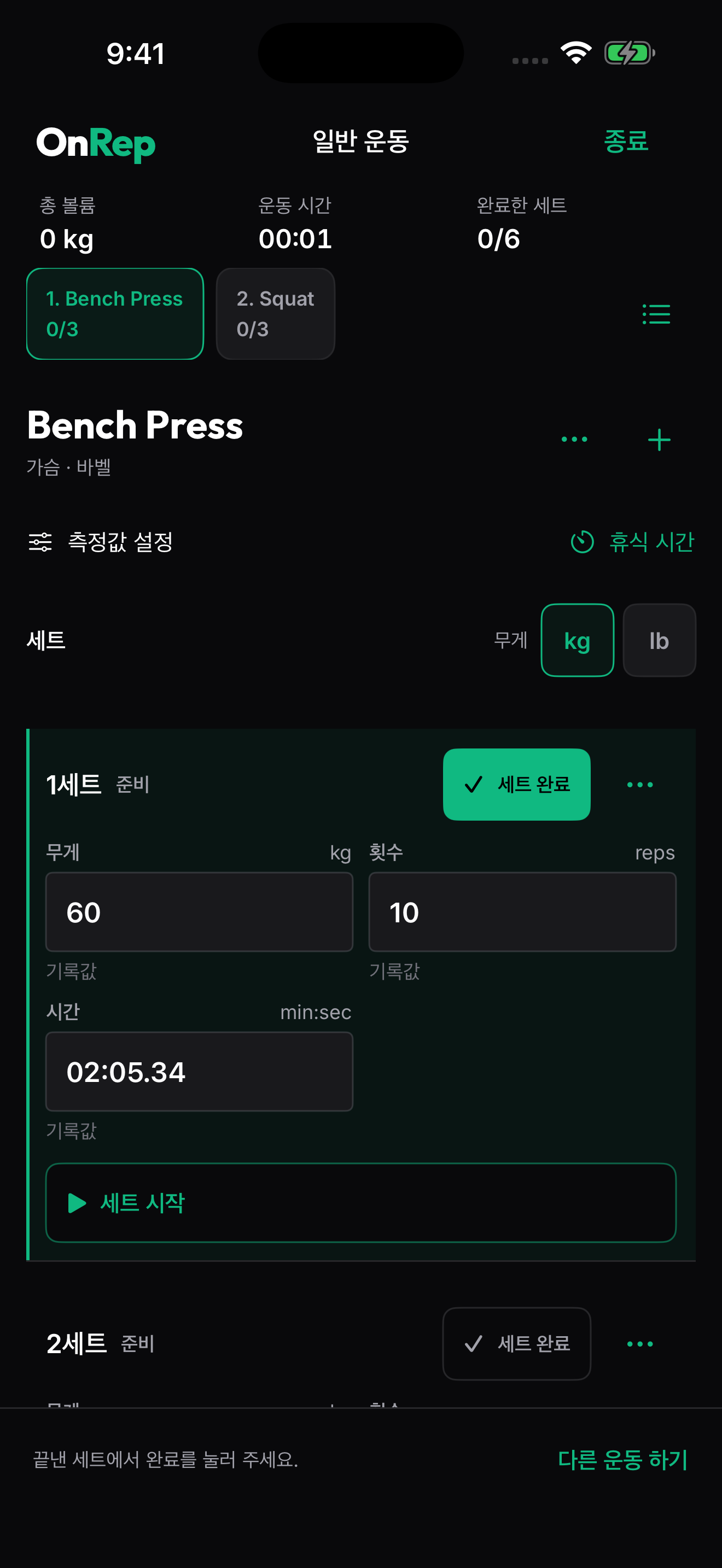
Actual OnRep weight training log app screen.

Strength

Rest time belongs in the set record.

Typical appsLoad, reps, and sets alone miss late-set quality and how your rest time changed across the session.
OnRepOnRep compares same-load reps, volume, and time between sets so the next set is easier to decide.

e1RM, same-load reps, volume lane, elapsed-time performance, program queue, and recovery-aware recommendation.

e1RMSame-load repsSet qualityProgram queue
Actual OnRep watch companion app screen.

Watch

Only the live numbers you need on the wrist.

Typical appsPulling out a phone during a run, interval, or HYROX station breaks the flow and hides the next action.
OnRepOnRep trims sets, distance, heart-rate zones, laps, next segment, finish, and undo controls for the wrist.

Apple Watch and Wear OS surfaces for strength, running, HYROX, live HR, laps, and finish controls.

Apple WatchWear OSHeart zonesFinish controls
Actual OnRep same-course and lap detection app screen.
Actual OnRep pace by grade app screen.
Actual OnRep pace by heart-rate zone app screen.

OnRep session guides

Choose what today's workout should be compared against.

Strength training, running, and HYROX do not improve in the same way. OnRep records each session in the format that makes the next comparison useful.

SessionsGeneralSessionsRunningSessionsHYROX

Sessions

3

Pick a session type and see which numbers OnRep uses to turn the next workout into progress evidence.

Strength · Load · Conditioning

General training

Exercise-specific metrics · Difficulty and time per set

Live metrics · GPS · Ghost Pace

Running session

Adjusted pace and HR zone · GPS and watch status

8 runs · 8 stations · team flow

HYROX session

16-segment growth analysis · Run and station split

A lifter preparing for a barbell set in a dark modern gym with conditioning equipment.
General

Strength · Load · Conditioning

General training

Today's load, reps, difficulty, time, tension hold, and volume become evidence you can compare in the next session.

Exercise-specific metricsDifficulty and time per setVolume and notes guard
Explore sessions
A runner wearing a sport watch on a riverside route at dawn.
Running

Live metrics · GPS · Ghost Pace

Running session

The live screen helps you judge whether you are on pace, how hard the effort is, and whether GPS and watch data are reliable.

Adjusted pace and HR zoneGPS and watch statusMap and finish controls
Explore sessions
A hybrid athlete pushing a weighted sled on turf in a functional training gym.
HYROX

8 runs · 8 stations · team flow

HYROX session

Each of the 8 runs and 8 stations stays separate, so the next training block can focus on where time actually changed.

16-segment growth analysisRun and station splitRace-style and scaled records
Explore sessions

Exercise learning

Before you log more, learn what to compare.

OnRep does not turn learning into random form tips. It shows which records, such as load, reps, range of motion, and rest time, make progress easier to compare.

Public preview

3

Beginner concept cards

Goal

01

Your goal changes which record matters

The same exercise can be useful for muscle, strength, power, or endurance, but the record that proves progress changes with the goal. Without a goal, advice from different contexts gets mixed together.

What to compare in OnRep

Pick one goal for this training block, then choose one variable to keep stable and one metric to compare.

Consistency

02

Changing exercises too often can blur your progress baseline

Changing exercises is not automatically bad. Variety can help you explore new angles, tools, and environments, but progress comparisons need at least one exercise pattern that stays stable for a while.

What to compare in OnRep

Even when you add new exercises, keep one reference exercise and its range of motion stable for 3 to 4 weeks.

Set count

03

More sets are not always better

Adding sets can increase practice and training volume, but if reps, range of motion, or rest time break down, you are no longer comparing the same ability. The useful set count depends on the goal.

What to compare in OnRep

Before adding a set, check that target reps, range of motion, and rest time stayed steady; if the next set drops sharply, adjust load or rest before chasing more sets.

View exercise learningStart logging in the app

You log the workout. But can you tell what changed?

A PR, faster run, or heavier set can come from fitness, conditions, rest, or a harder push. OnRep keeps the context next to the number.

What normal logs leave you to guess

  • Was the PR on a different route or heart rate?
  • Are running and strength split across tools?
  • Does a low first number feel meaningless?
  • Are you cleaning up spreadsheets after training?

What OnRep makes clearer

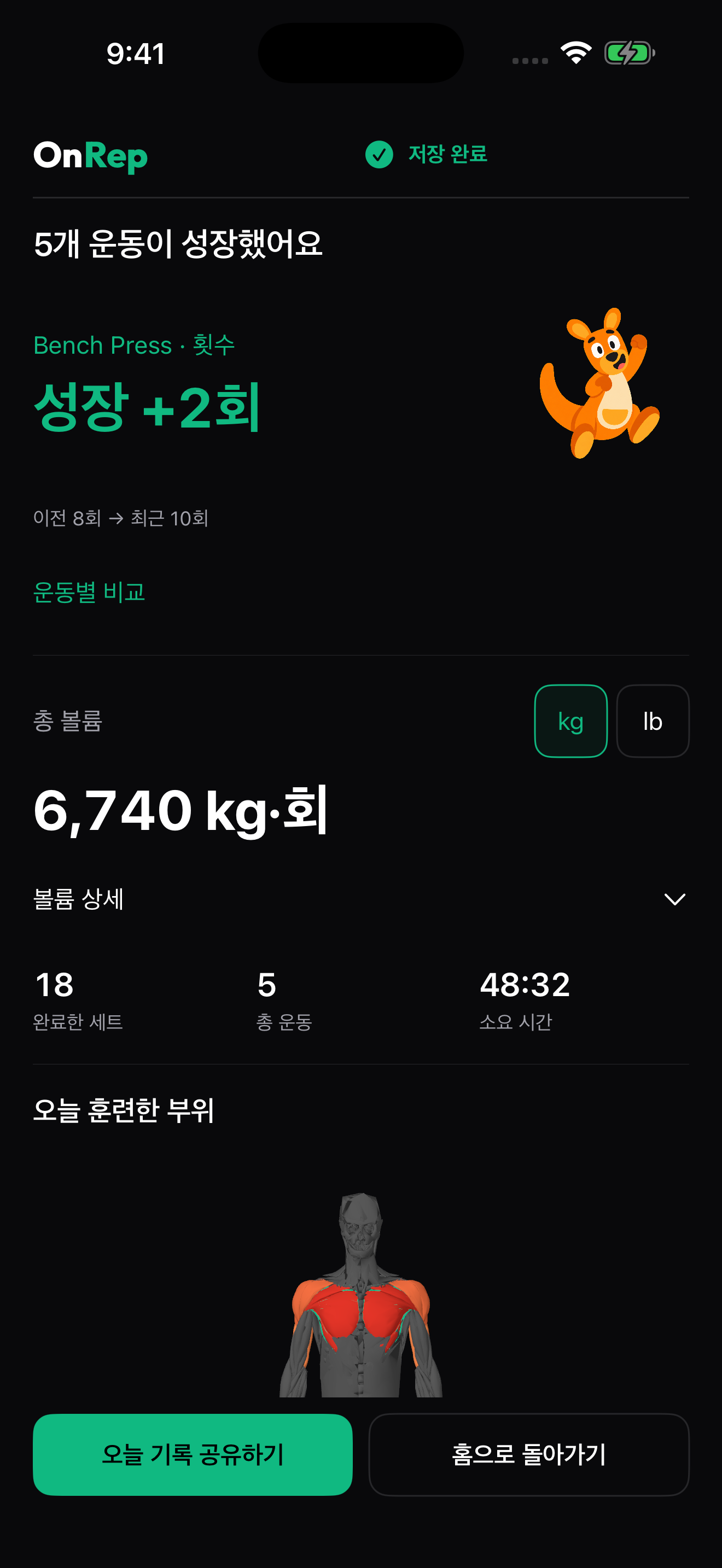
  • Same-HR pace and same-load rep comparisons
  • PR character with course, grade, and effort context
  • Early growth signals after a few sessions
  • Weekly and monthly growth-report flow

Progress judgment, not just more data

OnRep does more than store workouts. It organizes the context you need to see what improved under fairer conditions.

01

Fair comparisons

Compare like with like: same route, similar heart effort, same load, or repeatable session setup.

02

PR character

See whether a better number looks closer to better fitness, better conditions, or a harder push.

03

Reports without spreadsheets

Turn strength, running, and HYROX logs into weekly and monthly progress-report flow.

How OnRep turns logs into proof

1

Record the session

Track strength, running, or HYROX in the structure that fits the workout.

2

Keep the context

Preserve heart rate, route, grade, load, reps, rest, and effort next to the number.

3

Compare fairly

Put similar work beside similar work so the change is easier to read.

4

Decide the next move

Train harder, hold steady, or keep collecting baseline data.

Where OnRep fits with the apps you already use

Keep the tools you like. Add the layer that judges whether the numbers became better under fair conditions.

User questionWhat a normal log showsWhat OnRep adds
Was that PR real progress?A new best number and datePR character with route, heart rate, effort, and rest context
Am I faster at the same effort?Average pace and distanceSame-HR pace, grade, lap, and route comparison
Am I stronger at the same load?Weight and repsSame-load reps, set quality, and rest-time change
Is training actually working?Session list and chartsEarly signals after a few sessions plus weekly/monthly reports

Start with the situation that sounds like you

01

Hybrid exercisers

Strength in one app, running in another, HYROX in notes? OnRep turns scattered numbers into one growth flow.

02

Runners who want context

See whether pace improved at the same heart effort, on a similar route, with grade and laps considered.

03

Lifters chasing better PRs

Make low first numbers and small PRs useful by comparing same-load reps and repeatable baselines.

Free is enough to train. Pro goes deeper.

Free includes unlimited logging, measurement fields, history, 1RM, and basic stats. Choose Pro when you need deeper progress analytics.

Free
$0/Forever free
  • Workout and running logs
  • Unlimited sessions and sets
  • Unlimited measurement fields
  • Full workout history
  • 1RM measurement + basic stats
  • Offline logging
Start Free
ProAdvanced analytics
$4.99/month
$39.99/year (33% off)
  • Everything in Free +
  • Multidimensional capacity profile
  • 12-week trends + ACWR alerts
  • AI workout recommendations
  • Auto backup + CSV export
See Pro analytics
OnRepOnRep© 2026 OnRep. All rights reserved.
App StoreGoogle Play
Privacy PolicyTerms of ServiceOpen-source licensesUpdatesContactonrepforbty@gmail.com
Strength · running · HYROX growth flow

One growth flow for scattered training logs

Different sports need different fields. The question stays the same: did you improve under comparable conditions?

01HYROX

Compare runs and 8 stations in one flow

Judge what to change before the next race by reviewing segment time, heart response, and bottleneck stations together.

SkiErgSled PullBurpee Broad JumpFarmer's CarryLunges+2
02Martial Arts

Conditioning fatigue with repeatable baselines

Track supporting conditioning volume and heart-rate response without turning sparring into a spreadsheet.

Battle RopeSlam BallTire FlipPull-upsBurpees+1
03Running

See if you are faster at the same heart effort

Look beyond average pace with course, grade, laps, and same-heart-rate pace comparisons.

IntervalsTempo RunsHill SprintsRecovery Jogs
04Recovery

Keep recovery inside the training story

Log recovery work and body state between harder sessions so your next push has context.

Vinyasa FlowYin YogaPower YogaCore Yoga
05Functional Training

Compare kettlebells and sled work by quality

Split mixed sessions into comparable fields across load, distance, time, and heart effort.

Kettlebell SwingTurkish Get-UpBattle RopeFarmer's CarrySled Push
06CrossFit

Turn WOD scores into the next weak point

Keep more than the score by reviewing movement bottlenecks and repeatable baselines.

SnatchClean & JerkTwo-Hand SwingBox JumpMuscle-Up+1

Your first log is the baseline. After a few sessions, OnRep can surface comparable change signals.

Frequently Asked Questions

No. If you already like a logging tool, keep using it. OnRep adds the progress-judgment layer: it helps compare strength, running, and HYROX logs under fairer conditions so the numbers are easier to trust.

Yes. Your first log is the baseline. After a few sessions, OnRep can compare similar routes, heart effort, loads, and setups to show what changed.

Instead of only showing the new best number, OnRep keeps route, grade, heart rate, rest, and effort context nearby so the PR is easier to interpret.

Free lets you start workout logging, measurement fields, history, basic stats, and offline logging. Choose Pro when you need longer trends and deeper progress analytics.

Start logging workouts on iOS and Android. Use the web for account and pricing information.

Record the next workout. See what changed.

Start free. After a few sessions, OnRep can compare your logs under fairer conditions.

Start my first log
App StoreGoogle Play

No card required · Your first log becomes the baseline

Logging is free · Upgrade to Pro when deeper analysis matters